
Executive Summary
If all you need is a conversation with AI, a chat interface may seem sufficient. But continuing work, resuming it on another day, using external systems, preventing dangerous operations, and enabling people to review the work all require structures beyond the conversation itself.
The key to understanding Google Antigravity is to view it not as AI chat, but as a workplace for Agents.
- A Project is a work boundary that brings together the files, rules, and conversations for an engagement
- A Conversation is an execution unit with a purpose and history
- A Scheduled Task is a mechanism for rerunning work based on time
- MCP is a standardized interface for reaching external systems
- Security / Permissions are controls that restrict which operations are allowed
- Artifacts such as Plans, Diffs, and Walkthroughs provide evidence for human oversight
Following the sequence of Build With Google Day 1 Lab 1, this article explains why these elements together constitute a workplace.
Where We Are in the Series
This five-part series explores the question, “AI has become extraordinarily capable. But can we truly entrust it with work?”
- What Is Agentic Engineering?
- Antigravity as a Workplace (this article)
- Agent Skills as Operating Manuals
- Process Design with Agents CLI and ADK Graph
- Evaluation Through Output and Trajectory
Connecting from the Previous Article—Capability Needs a Place to Work
In the previous article, I explained that even an exceptionally talented new hire cannot be entrusted with work without specifications, reference materials, tools, permissions, and inspections.
So where should all of these be managed?
An ordinary company has project folders, meeting rooms, internal systems, access badges, calendars, and review procedures. AI agents also need structures that serve the same purposes.
In other words, Antigravity manages not only “answers,” but also the environment that turns those answers into real work.
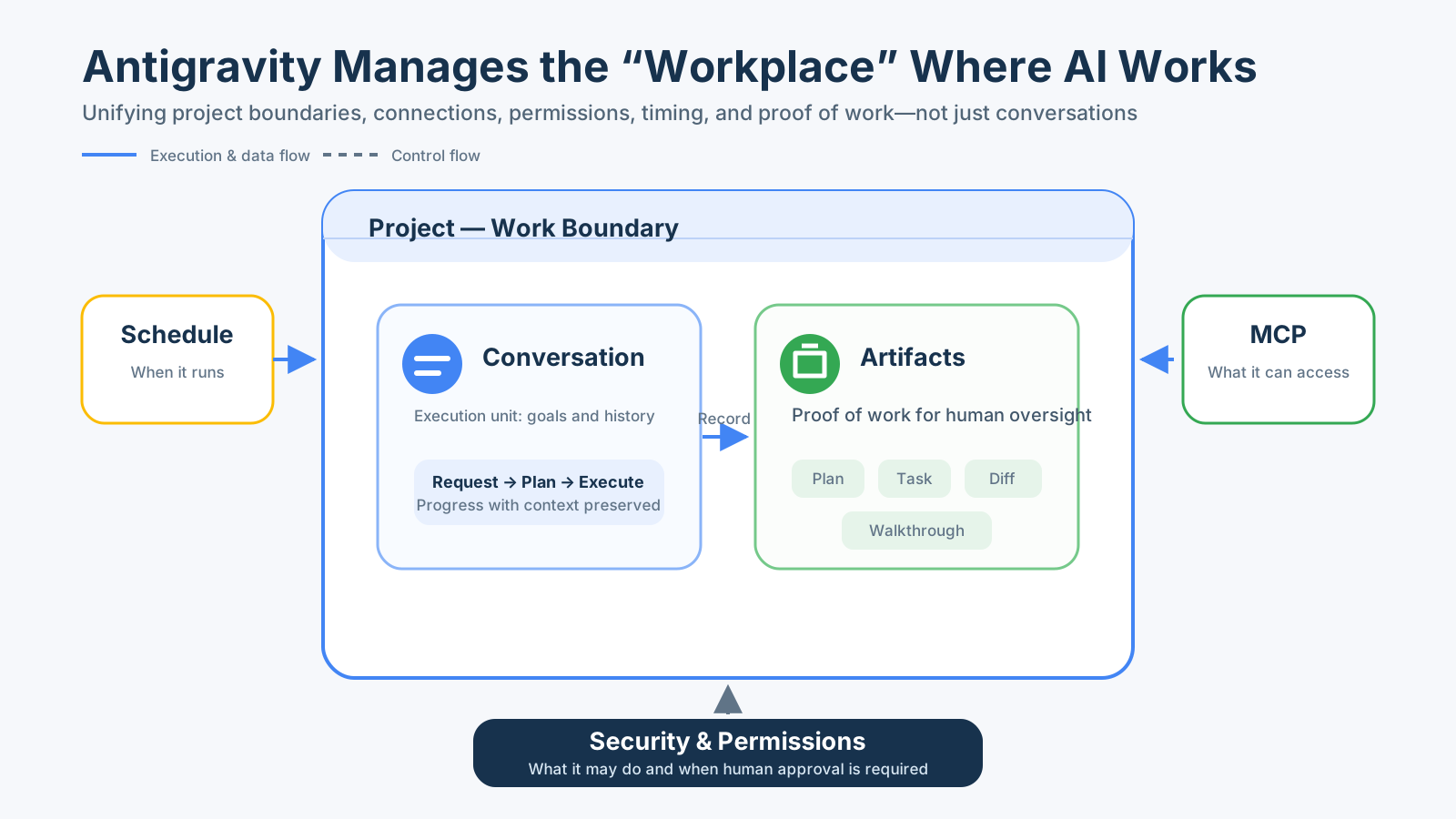
In this diagram, Conversations and Artifacts are placed inside the Project. Schedule and MCP initiate work and enable it to reach external systems. Security and Permissions impose boundaries on the whole environment by defining what may be done.
From here, we will examine each element in the order used in Lab 1.
1. Project—A Work Boundary for Each Engagement
Companies do not casually pile materials for Client A and Client B on the same desk. They separate folders, owners, rules, and conversations by engagement.
An Antigravity Project also serves a purpose beyond being merely a directory name. In Lab 1, you create a Project, start a Conversation within it, and work with Project-specific Settings and Skills.
On the VM, I confirmed that multiple Conversation histories are listed within a Project and can be resumed from the same workspace.
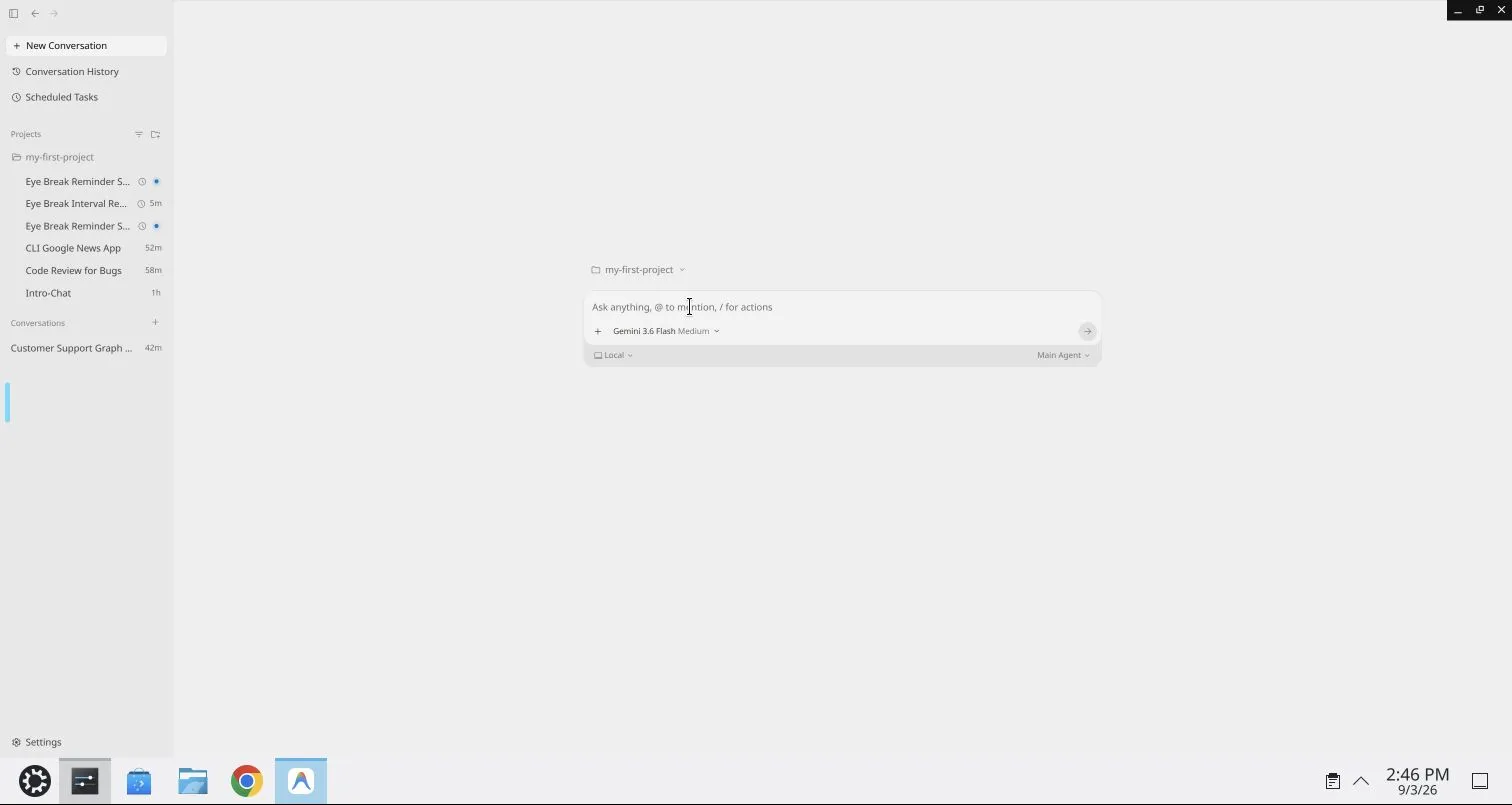
The important point is not simply that “conversations are saved.”
A single piece of work involves source code, design documents, past decisions, applicable Skills, and permitted Tools. A Project is the unit that binds them together as the context of the same work.
However, this screen alone does not establish that a Project provides complete security isolation. What can be observed directly here is that conversations and settings are organized by Project.
In other words, a Project is not merely “a place to store files.” It is the boundary that defines which world of work an Agent inhabits.
2. Conversation—An Execution Unit with a Purpose and History
If a Project is an engagement, a Conversation is an individual work request within that engagement.
“Implement a new feature” and “review the existing code” have different goals even when they use the same repository. Separating them into different conversations makes it easier to follow each request, the decisions made along the way, and the execution results as one coherent flow.
In Lab 1, you create a new Conversation from Agent Manager and also use Slash commands. In addition to free-form requests, Slash commands provide an explicit entry point to available predefined functions. Project-local Skills, which will be covered in Part 3, also appear among these options.
A Conversation has two roles.
- Execution context: what was requested, examined, and changed during this work.
- Unit of oversight: which plans and results a person reviews, and where that person intervenes.
A longer chat history is not inherently better. Mixing work with different objectives into a single Conversation leaves behind outdated assumptions and unnecessary instructions that can cloud decisions.
In other words, a Conversation is not merely a sequence of messages. It is a case file for an Agent execution with a specific objective.
3. Governance—Inheriting Workplace-Wide Rules into Projects
If security rules had to be explained verbally to every new hire for every task, omissions would inevitably occur. Companies define common rules at the organizational or departmental level and pass them down to individual engagements.
In the VM’s Project Settings, I confirmed settings for inheriting the General Security Preset and Artifact Review Policy.
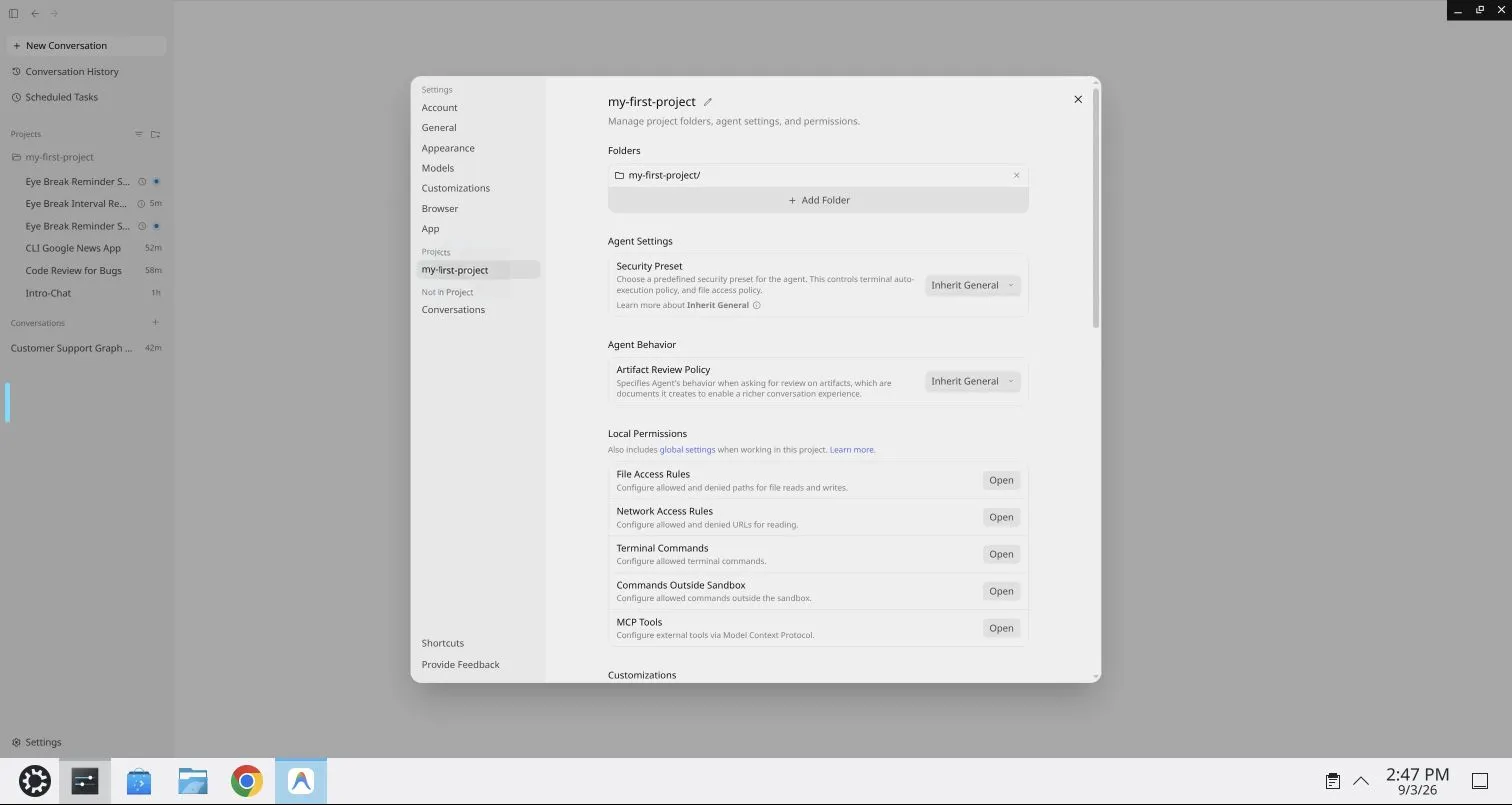
The overall settings interface also contained control points including Permissions and MCP Tools.
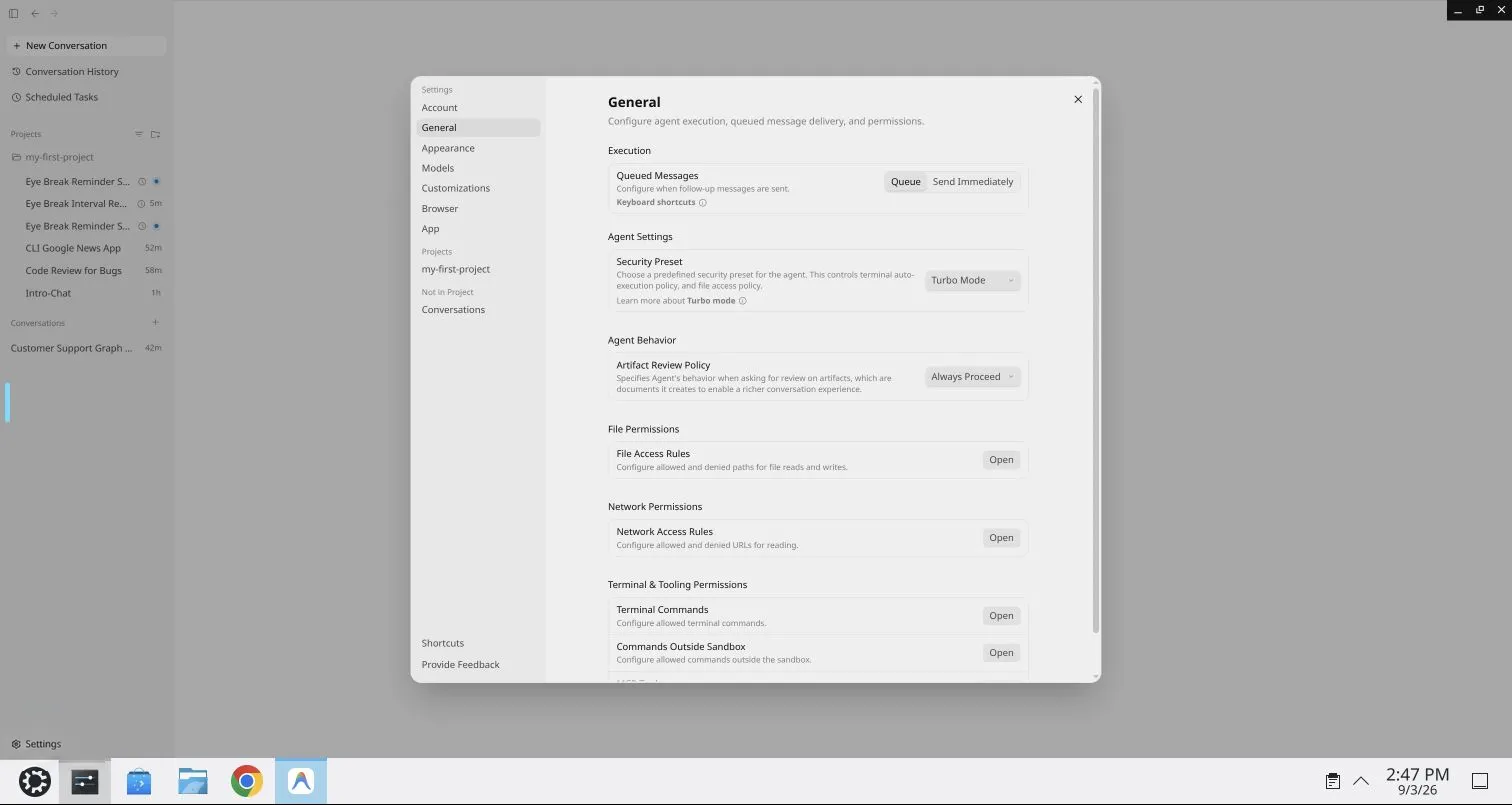
Inheritance is convenient, but it is also a mechanism that carries responsibility.
Defining sound rules at a higher level allows them to be applied consistently to new Projects. Conversely, inheriting overly broad permissions or ambiguous rules distributes the same problems just as consistently.
The existence of configuration options and the safety of their configuration are therefore separate matters. In production, at minimum, verify the following:
- Whether the defaults follow the principle of least privilege
- Whether dangerous operations require human confirmation
- Whether Project-specific exceptions remain visible
- Whether configuration changes can be traced afterward
In other words, Governance is not a feature that makes an Agent smarter. It is the mechanism that determines the boundaries within which that intelligence may be used.
4. MCP—An “Access Point” to External Systems
Even if a new hire understands the company’s rules, the work cannot proceed without access to internal databases or ticketing systems. Conversely, allowing unrestricted connections to anything is also dangerous.
MCP (Model Context Protocol) is a standardized boundary through which an Agent connects to external data and capabilities. In Lab 1, you add and manage MCP servers under Customizations in Settings and inspect the Tools exposed by each server.
The important point is not to think of MCP as “the external data itself.”
Agent
  ↓ Selects a Tool
MCP connection interface
  ↓ Invokes a defined operation
External system
Even if MCP standardizes the connection method, separate controls determine whether a Tool may be used, which Projects may use it, and whether it supports only reading or also modification. Lab 1’s Project Settings also demonstrate the concept of limiting which MCP Tools are permitted within a Project.
In other words, MCP establishes “what can be reached,” while Permissions determine “what may be done.” Only when both are in place does a Tool become suitable for business use.
5. Scheduled Task—A Contract for Re-execution, Not Just a Time
Suppose you assign a new hire the job of preparing a report every morning at 9:00. Simply writing “9:00” on the calendar is not enough.
- What will be used as input?
- In which Project and Conversation context will it run?
- Which Tools and permissions will it use?
- Where will success or failure be reported?
- What happens if the previous run stopped midway?
Only after these questions are settled does the work become repeatable.
On the VM, I confirmed a screen for registering Scheduled Tasks and managing recurring schedules, including daily and cron-based configurations.
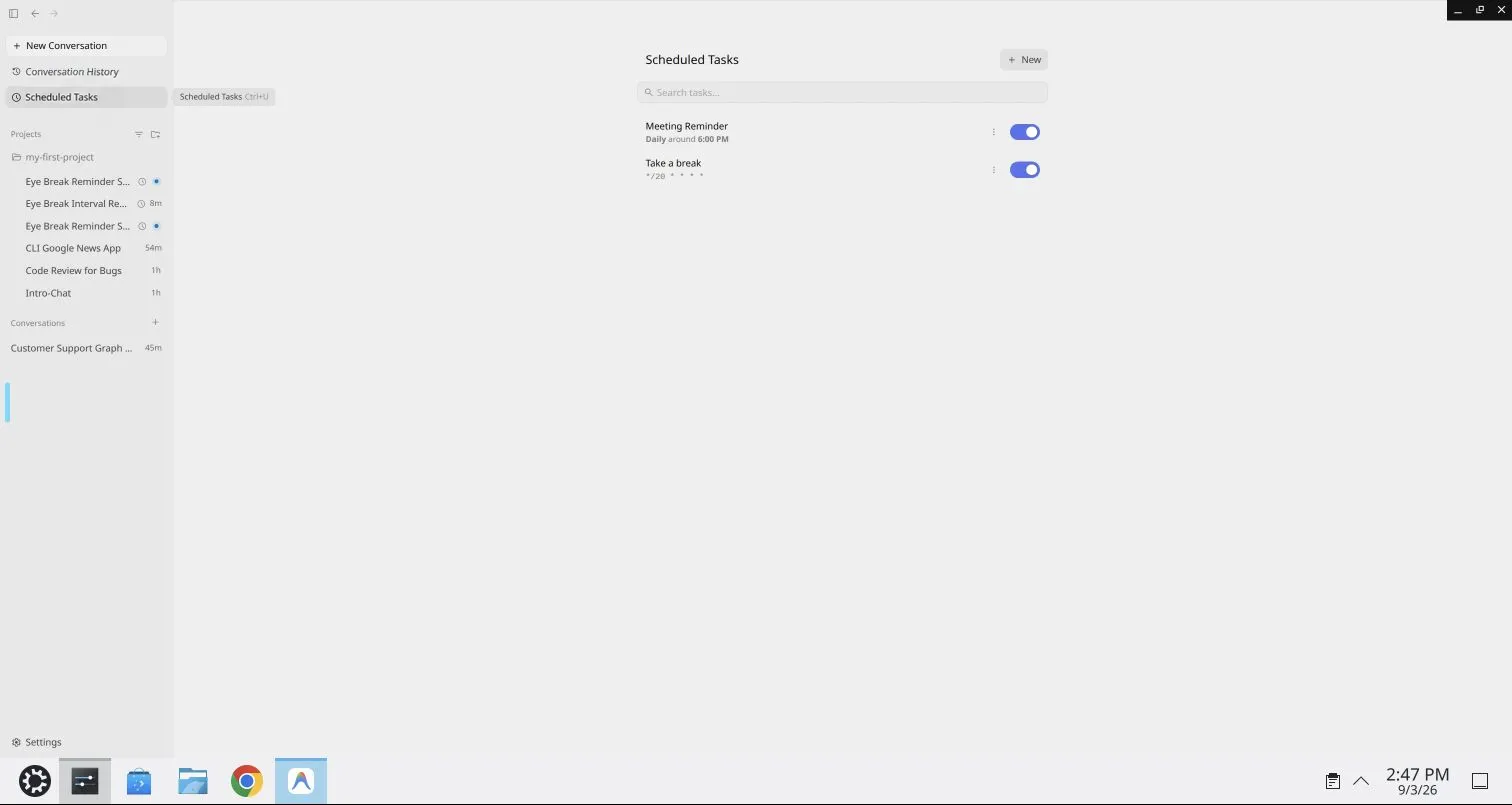
This screen demonstrates that schedules can be registered. However, it does not prove that identical results will be produced on time over an extended period. Changes to the model, reference data, permissions, or dependent environment can produce different results even for the same request.
When designing a Scheduled Task, define a contract that covers more than time.
| Contract | Question to Verify |
|---|---|
| Input | From what point in time should data be read on each run? |
| Context | Which rules and memory should be used? |
| Capability | Which Tools may be used? |
| Idempotency | Can it be rerun without processing anything twice? |
| Evidence | Where should success, failure, and changes be recorded? |
| Escalation | To whom should it return when something is ambiguous, dangerous, or unsuccessful? |
In other words, a Scheduled Task is not an alarm clock for an Agent. It is an operational contract for safely resuming work.
6. Artifacts—Making an AI’s “Done” Inspectable
If a human colleague reported only “It’s done,” you would review the plan, changes, and test results for any important modification. The same applies to AI agents.
Lab 1 covers Agentic Artifacts such as the following:
- Implementation Plan: what will be done, why, and in what order
- Task: a unit of progress that divides the work into smaller pieces
- Code Diff: what was actually changed
- Command Output: what tests and commands returned
- Walkthrough: what was ultimately done and how it was verified
On the VM, I confirmed that the Implementation Plan and post-implementation routing evidence appear together as evidence of the same work. Because the published screen also contains execution conditions unnecessary for the conceptual explanation in this article, they are not reproduced here; only the structure is discussed.
The value of an Artifact does not lie in the AI’s ability to produce a polished report. It lies in enabling people to compare claims against the actual work.
“Implemented”
  ├─ Plan: What was supposed to be implemented?
  ├─ Diff: What was actually changed?
  ├─ Test: Did it work as expected?
  └─ Walkthrough: What were the results and remaining issues?
Even if the Diff matches the Plan, the requirements themselves may be wrong. Even if the tests pass, the test coverage may be insufficient. Artifacts do not automate judgment out of existence. They transform work into a form that people can evaluate concretely.
In other words, Artifacts are less the Agent’s deliverables than an inspection interface placed between humans and Agents.
Going One Level Deeper: Understanding Antigravity Through Three Planes
To organize these multiple capabilities, it helps to divide them into the following three planes.
| Plane | Primary Elements | Question |
|---|---|---|
| Control Plane | Project Settings, Security, Permissions, Schedule | What is allowed, when, and to what extent? |
| Execution Plane | Conversation, Agent, MCP Tools | What is actually read, invoked, and changed? |
| Evidence Plane | Plan, Task, Diff, Command Output, Walkthrough | What can be proven to have happened? |
Here, “Control Plane” is an architectural interpretation used in this article and may not be a product name displayed in the interface.
The three planes are separated because they involve different kinds of failures. Trying to correct a permission configuration problem by rewriting the Prompt does not address the root cause. If execution failed, revising only the final report does not make the work successful. If no evidence remains, the cause cannot be investigated later.
Moreover, the three planes are not independent. A Schedule initiates a Conversation, the Conversation invokes an MCP Tool, Permissions restrict whether that invocation is allowed, and Artifacts record the result. This coordination creates the “workplace.”
Key Takeaways
- Antigravity is more than a conversational UI. It can be understood as an Agent workplace that brings together Projects, connections, permissions, time, and evidence.
- MCP and Permissions have separate responsibilities. The ability to connect and the authorization to perform operations are distinct.
- Artifacts are points of oversight. They make it possible to compare an AI’s completion report against its plan, changes, and execution results.
Next Time
Even with workplace-wide rules and tools in place, there are still no procedures for individual tasks, such as “how to review this code” or “which aspects must always be checked.”
Should we write a lengthy explanation from scratch every time? Or is there a way to open only the procedures required for a particular task when they are needed?
Next time, we will design Agent Skills as “reusable operating manuals”.