
Introduction—What If You Had to Distribute an AI Development Environment to Many Participants Tomorrow?
Imagine the following situation.
You have been asked to run an AI agent development event with a large number of participants. Some participants bring Macs, while others bring Windows PCs. Corporate-issued devices have proxies, DLP, and endpoint security installed, and their Python and Node.js versions are inconsistent. Some people are already signed in to Google Cloud, while others may confuse their everyday Google account with the account provided for the lab.
At the same time, the event has a strict time limit. If everyone has to begin by setting up their environment, that alone could consume half the day. However, if dependencies and permissions are locked down too tightly, participants lose the enjoyment of operating AI agents themselves.
What is needed here is not simply “providing a high-performing model.”
- Where should differences between participant devices be absorbed?
- What should be common to everyone, and what should be specific to each set of instructional materials?
- How should large volumes of instructions be provided to the AI?
- How can execution speed and safety be reconciled?
- What should be used to verify an AI’s claim that it is “done”?
- How can participants whose environments break partway through be returned to the learning path?
All of these elements must be designed as a single system.
An examination of the Antigravity environments and Agent Skills used during Day 1 and Day 2 of Build With Google 2026 reveals one possible answer to this difficult problem.
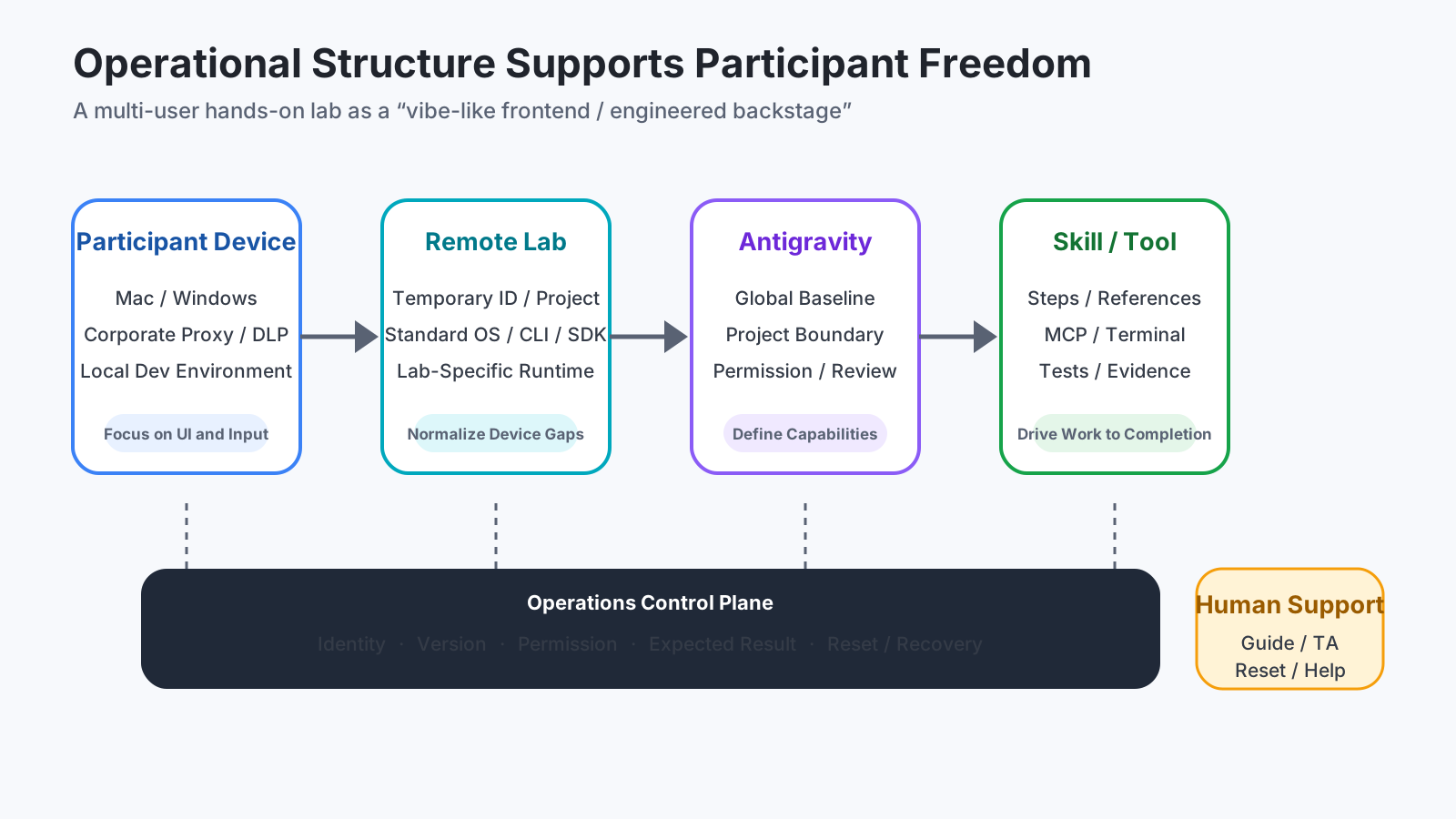
On the surface, participants make requests freely in natural language. Behind the scenes, however, the environments, permissions, procedures, reference materials, expected results, and recovery paths are structured in considerable detail.
The central theme of this article is to interpret that design through the following phrase:
Vibe-like frontend, engineered backstage
Give participants a sense of freedom to explore while engineering the underlying system so that this freedom does not lead to accidents or leave them lost.
What You Will Learn
Rather than retracing each lab procedure, this article examines the design one level above them.
- How Antigravity’s Global and Project settings were used differently
- Why a Skill functioned not merely as a collection of prompts, but as a distribution unit for instructional materials, procedures, constraints, and verification
- How the role of Skills changed across Day 1 Lab 1 / Lab 2 and the Day 2 Platform / App / Business tracks
- What external structures are required to make highly autonomous execution safe
- What organizations should manage when applying the same ideas to enterprise AI agent platforms
This article also keeps different kinds of facts separate.
- Observation: What could actually be confirmed from guides, settings screens, Skill definitions, and execution results
- Official specification: What is stated in Google’s public documentation
- Analysis: Design interpretations derived from observations and official specifications
This article does not make speculative claims about the event environment’s internal implementation or the authorship of individual files.
1. The First Problem Is Not AI, but Differences Between Participant Devices
When providing the same exercise to many participants, environmental differences surface sooner than model-quality issues.
When everything is installed directly on local PCs, the following differences spill into the exercise.
| Difference | Common problem |
|---|---|
| OS and CPU | Commands, paths, and binary compatibility differ |
| Python / Node.js / CLI | Output differs from the guide, dependency resolution fails, or incompatibilities occur |
| Corporate proxies and DLP | Package retrieval, WebSockets, clipboard access, or downloads are blocked |
| Existing accounts | Personal environments are confused with the Cloud Project provided for the exercise |
| Local permissions | Setup results differ depending on the availability of administrator privileges |
| Security products | Terminals, browsers, or generated files are quarantined |
In this event, much of the responsibility for execution was moved to temporary remote environments accessed through a browser. The local PC primarily handled display and input, while the OS, SDKs, CLIs, cloud connectivity, and instructional files were placed in the lab environment.
Importantly, this does not mean that “every lab used an entirely identical VM.” In the environments that could be inspected, a common Ubuntu-based desktop was used, but versions of agy, agents-cli, the Google Cloud SDK, and other components differed by lab.
The design therefore appears closer to the following than to a single massive Golden Image:
Common base
  ├─ OS, Desktop, Browser
  ├─ Core Antigravity functionality
  └─ Path for connecting to a temporary account

Instruction-specific layer
  ├─ Required CLI / SDK versions
  ├─ Project-local Skill
  ├─ Starter code / sample data
  └─ Expected execution results
There is a reason for this division. Consolidating everything into a single image makes it easier for an update to one track to break another. Conversely, building every environment separately increases operational costs. A “common base plus fixed instruction-specific layers” is a compromise between reuse and reproducibility.
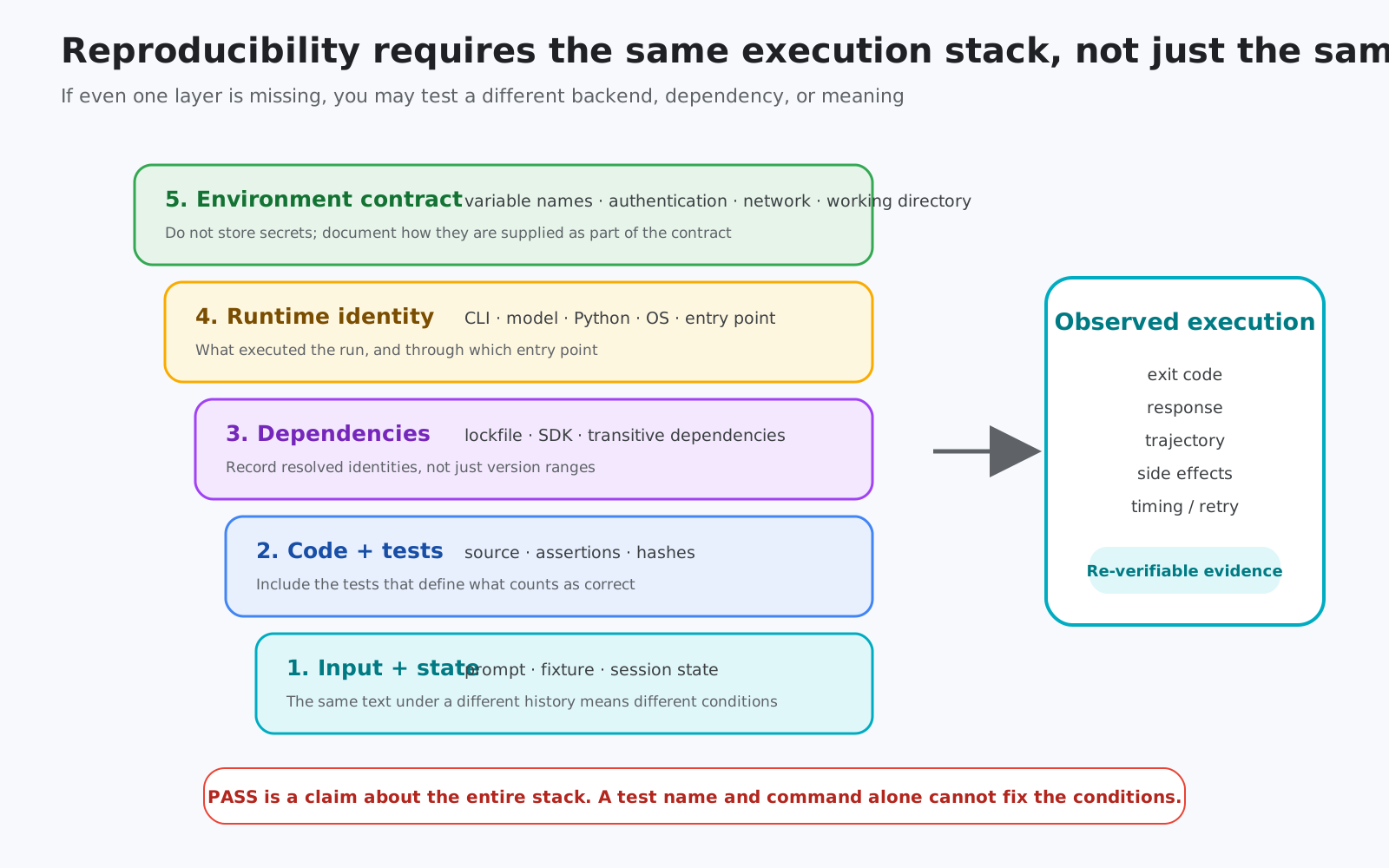
However, this also creates a new operational challenge. If versions differ by lab, the assumed pairing between instructional materials and execution environments must be recorded as a contract. Reproducibility is not simply a matter of running the same commands; it requires aligning the same inputs, dependencies, execution identity, permissions, model, and state.
Recap
The point so far is not as simple as “using VMs solves the problem.”
- Remove differences between local devices from the core of the exercise
- Separate common components from instruction-specific components
- Manage combinations of instructional materials and execution environments as versions
- When failures occur, reassign the environment and return the participant to the learning path
Antigravity’s settings and Skills are built on top of this foundation.
2. Reading Antigravity Settings as a Control Plane, Not as Convenience Features
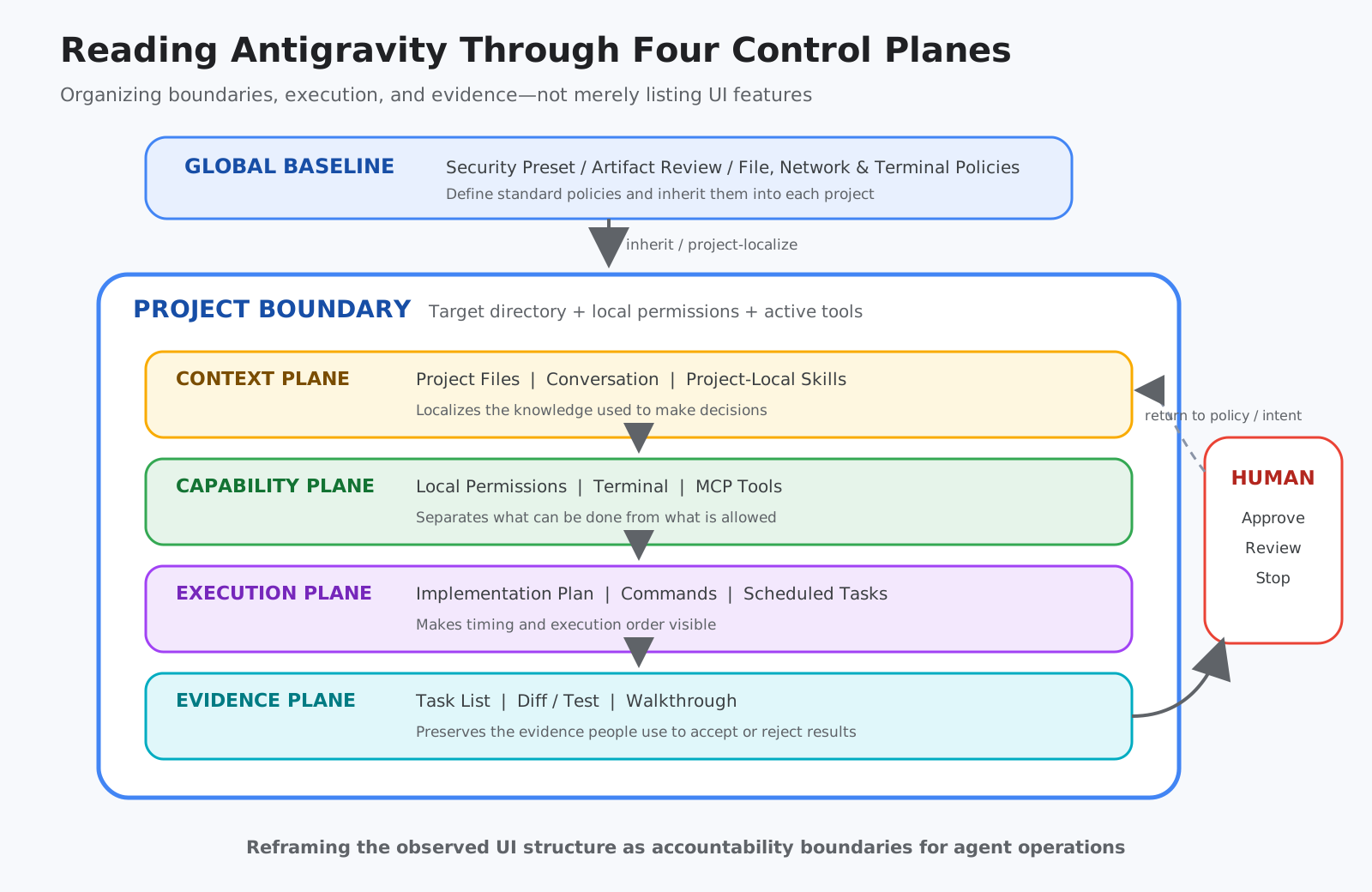
Antigravity’s settings screen includes Queued Messages, Security Preset, Artifact Review Policy, File Access, Network Access, Terminal Commands, Commands Outside Sandbox, MCP Tools, and other options.
Memorizing these as a list of UI items misses the point. What matters is which question each setting answers.
| Control plane | Main settings and features | Question answered |
|---|---|---|
| Scope | Project, Conversation, target Folder | What should be treated as one unit of work? |
| Context | Rule, Skill, Project files, Memory | What should be known before making decisions? |
| Capability | File, Network, Terminal, MCP | What can be done, and what is permitted? |
| Execution | Queue, Plan, Task, Scheduled work | When and in what order should work run? |
| Evidence | Artifact, diff, test, trace, walkthrough | On what basis should a person accept or reject the result? |
Global Defines Common Policy; Project Defines Work-Specific Differences
In the Day 1 projects and the Day 2 Platform project that could be inspected, the Security Preset and Artifact Review Policy inherited their Global settings. Meanwhile, the Project level provided ways to localize the target Folder, Local Permission, MCP Tools, and other settings.
This closely resembles enterprise policy design.
Organization-wide or user-wide Baseline
        ↓ inheritance
Project-specific Folder / Permission / Tool
        ↓
Skills and reference materials available only within the Project
Placing everything at the Global level may appear easier to manage. However, it exposes Tools and procedures to unrelated Projects, expanding both the area in which incorrect selections can occur and the scope of their impact. Conversely, copying common settings into each Project leads to Configuration Drift as their contents gradually diverge.
A natural design is therefore to place the common Baseline at the Global level while containing work-specific knowledge and permissions within each Project.
Observed Settings
The following table shows the state at the time of observation. The Day 1 environment was inspected after the exercise, so these values cannot be assumed to match the initial state immediately after distribution.
| Environment | Observed model | Execution and review settings | Project characteristics |
|---|---|---|---|
| Day 1 Lab 1 | Gemini 3.6 Flash Medium | Queue, Turbo Mode, Always Proceed | my-first-project inherited Global settings |
| Day 1 Lab 2 | Gemini 3.6 Flash Medium | Same UI values as Lab 1 | Agents CLI Skills were registered globally during the exercise |
| Day 2 Platform | Gemini 3.8 Flash High | Queue After Turn, Turbo Mode, Always Proceed | Session1 and others inherited Global settings, with instructional Skills placed inside the Project |
| Day 2 App | gemini-3.6-flash confirmed in the generated Agent |
Initial values could not be confirmed in the currently reassigned environment | The Starter provided Project-local Skills and MCP |
| Day 2 Business | Did not use Antigravity | Not applicable | Agent / Workflow configuration in Gemini Enterprise |
Why Turbo Mode and Always Proceed?
Viewed in isolation, Turbo Mode and Always Proceed suggest an approach of “reducing approvals and executing everything automatically.” For the event experience, that interpretation is broadly accurate. To experience a multistep process within a limited time, it is easier to make progress when every step is not interrupted by a confirmation dialog.
However, it would be dangerous to conclude from this that the same settings are recommended for production.
At the event, the following external conditions served as safety nets:
- A temporary environment that could be discarded after the event
- A Project restricted to the scope of the instructional materials
- Pre-provisioned input data and Cloud assets
- Expected results documented in the guide
- A Project-local Skill defining the progression rules
- Human instructors, support, and reset paths
In other words, increased autonomy was offset by externally constraining the execution environment’s lifespan, reach, data, and recoverability.
This also applies to production design. Instead of merely adding more approvals, organizations can reduce unnecessary approval steps while maintaining safety by providing recoverable Sandboxes, limited permissions, dry runs, fixed fixtures, and automated tests.
High autonomy does not mean having fewer safeguards. It means replacing human clicks with more reproducible structures.
3. What Is a Skill? An On-Demand Work Package, Not a Long Prompt
Google’s Antigravity Skills Codelab describes a Skill as a directory-based package containing SKILL.md and, when needed, scripts, references, and assets.
Its minimal structure looks like this:
my-skill/
├── SKILL.md          # When to use it and how to proceed
├── scripts/          # Deterministic processing, when needed
├── references/       # Specifications and procedures read only when needed
└── assets/           # Templates and static materials
This structure addresses the problem of overloading Context.
If many operational procedures are always included in the System Prompt, irrelevant knowledge is loaded on every turn. This not only consumes the Context Window, but also causes similar instructions to conflict and buries important constraints.
With Skills, only lightweight information—the name and description—is initially exposed. When a Skill is judged highly relevant to the request, its body is read, followed by only the necessary reference materials. This approach is Progressive Disclosure: a design in which information is revealed only when and where it is needed.
Skills, Rules, Tools, and MCP Have Different Roles
These concepts are easily confused, so consider their workplace equivalents.
| Mechanism | Main role | Workplace analogy |
|---|---|---|
| Rule | Constraint that always applies | Employment rules or security policy |
| Skill | Procedure for a specific task | Standard operating procedure or Runbook |
| Script | Reproducible mechanical process | Inspection equipment or automation machinery |
| Tool / MCP | Ability to reach external systems | Business terminal, API, or measurement instrument |
| Hook | Process that always runs at a defined point | Access gate or automated inspection |
It is important for a Skill to state, for example, that dangerous operations must not be performed. However, this alone should not be treated as an enforceable security boundary. Natural-language instructions are a layer that guides judgment. Operations that must be reliably blocked should also be prevented at more deterministic layers, such as File / Network / Terminal Permission, Sandbox, IAM, Hooks, or approval Workflows.
The distinction can be summarized as follows:
A Skill teaches “how to work.” Permissions determine “what is actually possible.”
4. Not Everything Should Be Called a “Google-Provided Skill”
Skills visible within an environment can have multiple origins. Combining them leads to a misreading of the design.
| Origin | Meaning | Example |
|---|---|---|
| Product Built-in | Common knowledge provided by Antigravity itself | antigravity-guide |
| Official Google tool | Development Skill installed by Agents CLI | google-agents-cli-eval |
| Pre-provisioned for the event | Skill placed in the Project to guide a lab | novasmart-governance-lab |
| Starter repository | Skill included in code retrieved for the exercise | enable-a2ui |
| Participant-created | Skill created by participants by following the guide | code-review |
| Bundled with a dependency package | Skill present inside a Library but not necessarily registered | FastAPI-related Skills, among others |
| Internal product template | Internal workflow template for Session operations | commit, fix-ci, and others |
At least the following three Built-in Skills were directly observed:
| Built-in Skill | Main role |
|---|---|
antigravity-guide |
Guidance for using the IDE, CLI, SDK, Slash commands, settings, Skills, and related features |
agy-customizations |
Guidance on choosing among Rules, Skills, Plugins, Hooks, and MCP |
permissioned-github |
Git / GitHub operations and Permission handling |
The important point is that a file’s existence is not the same as its availability for the current work.
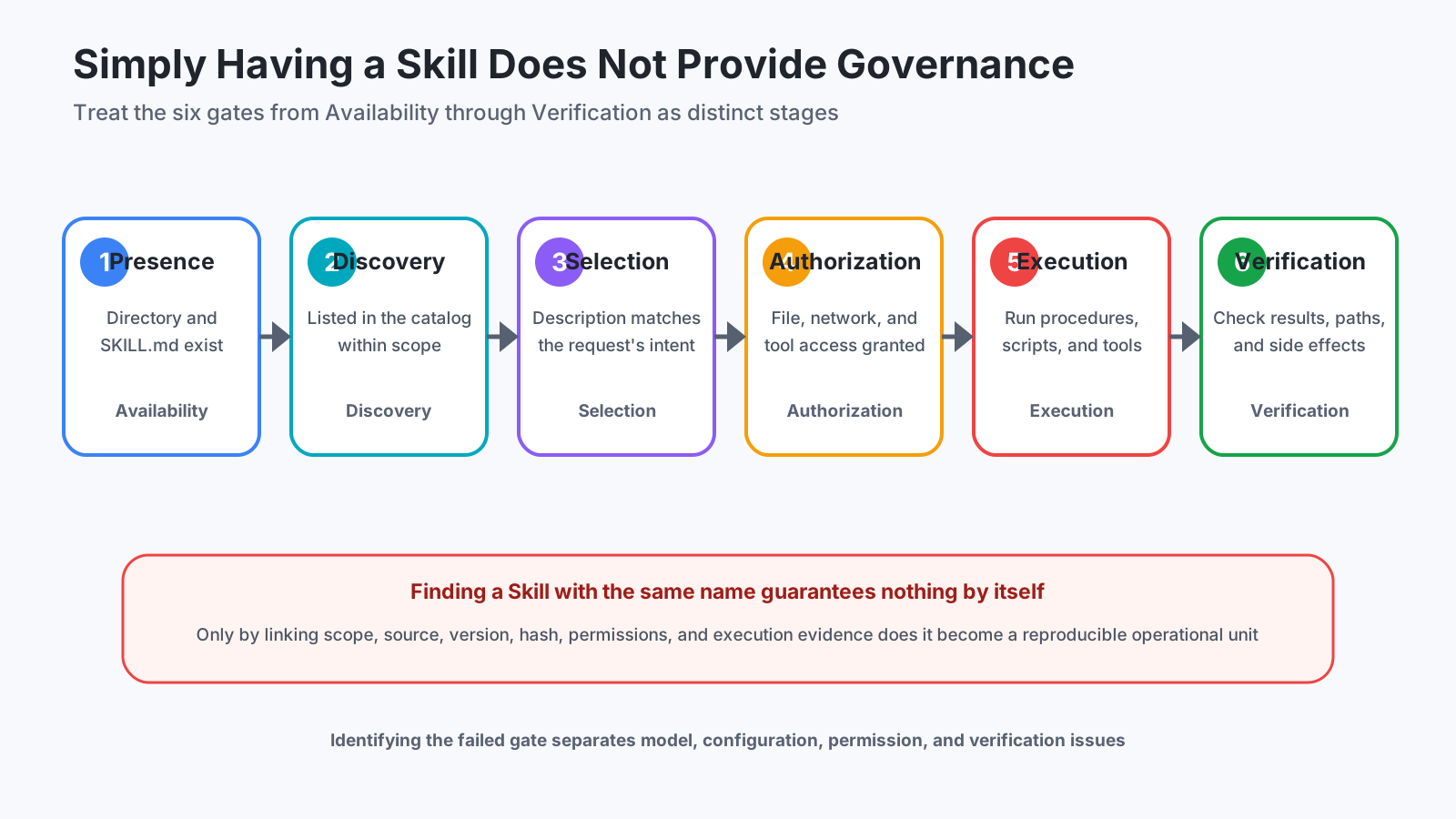
Skill operations involve at least six gates.
- Availability: The Skill exists on disk
- Discovery: The Agent can discover it within the current Scope
- Selection: The request matches the
description, and the Skill is selected - Authorization: The required File, Network, Terminal, and MCP permissions are available
- Execution: The body, Script, and Tool calls are actually executed
- Verification: The result, execution path, and side effects are confirmed to match expectations
For example, even if publish-to-github appears in the Skill list, that does not mean anything has been published to GitHub. The Skill may not have been selected, or authentication and permissions may be unavailable, making execution impossible. Even if it was executed, separate verification is required to determine whether the intended Repository was used.
The Same Skill Name Does Not Necessarily Refer to the Same Artifact
In Day 1 Lab 1, multiple instances of code-review with different contents were confirmed in different locations.
- One created in the current Project by following the guide
- One included in a previously saved Artifact
- One used as an internal Antigravity Session workflow template
An Inventory that records only names would treat all three as identical. Reproducible management requires, at minimum, Scope, placement Path, Source repository, Version, and Hash.
This is not unique to Skills. It is the same reason container images are not managed only as latest, and dependency packages are not managed only by name. Because Skills influence execution, they must be treated as part of the Software Supply Chain.
Recap
A Skill is a convenient unit that can carry all three of the following:
- Procedural knowledge provided to an Agent
- Reference materials and Scripts used by the procedure
- A reporting format for explaining success or failure
However, the mere existence of a Skill file guarantees neither safety nor success. It becomes an operational capability only when Scope, selection, permissions, execution, and verification are all in place.
The following sections examine how each Lab and Track used this mechanism differently.
5. Day 1 Lab 1—Why Participants First Create Only One Skill
In Day 1 Lab 1, participants create a Project-local code-review Skill themselves.
Its scope is relatively small.
- Whether the code behaves as intended
- Whether exceptions or edge cases have been overlooked
- Whether there are obvious performance problems
- Whether problematic locations are identified with line numbers
- Whether the reasons for corrections are explained
At first glance, this may look like a simple code-review prompt. As instructional design, however, it is carefully constructed.
Through this single Skill, participants experience the following sequence:
- Place a Skill under a Project
- Describe “when to use it” in the
description - Define review criteria and the output format in the body
- Request a code review
- Observe the result of the Agent selecting the Skill
- Verify whether the actual findings follow the Skill’s contract
It is easier to understand the mechanism by creating one Skill and observing discovery and selection than by viewing dozens of Skills from the outset.
What is being taught here is not merely “how to perform a code review.”
Convert tacit knowledge into a reusable package with selection criteria and execution procedures.
This conversion is the fundamental operation involved in designing Skills within an enterprise.
6. Day 1 Lab 2—Dividing the Agent Development Lifecycle into Seven Parts
In Lab 2, participants use uvx google-agents-cli setup to make the Agents CLI development Skills available. The following seven Skills were confirmed:
| Skill | Stage covered | Plain-language explanation |
|---|---|---|
google-agents-cli-workflow |
Entire Lifecycle | Explains the current stage and what to do next |
google-agents-cli-scaffold |
Scaffolding | Creates the skeleton of a new Agent Project |
google-agents-cli-adk-code |
Implementation | Writes the Agent and Tools according to ADK structures |
google-agents-cli-eval |
Evaluation | Evaluates not only responses, but also Tool selection and execution paths |
google-agents-cli-deploy |
Deployment | Delivers the Agent to Agent Runtime, Cloud Run, GKE, or another target |
google-agents-cli-publish |
Publication and registration | Registers and publishes the Agent so that it can be used |
google-agents-cli-observability |
Observability | Investigates behavior through Traces, Logs, and Monitoring |
Google’s Agents CLI is published as a tool that provides AI coding assistants with Skills for creating, evaluating, and deploying Agents. ADK’s Code with AI also presents an approach that progresses from Scaffold through implementation, testing, evaluation, and deployment.
Why Not Use One Massive ADK Manual?
Agent development requires extensive knowledge. However, when a Project is first created, there is no need to load the details of Deployment and Observability into Context.
Dividing the lifecycle into seven Skills allows only the knowledge required for the current stage to be loaded. This is not merely file organization; it is Context Engineering.
It also clarifies responsibility when something fails.
- If the Project structure is invalid, the issue belongs to Scaffold
- If the ADK implementation pattern is incorrect, it belongs to ADK Code
- If the evaluation dataset or metric is inappropriate, it belongs to Evaluation
- If connection to the execution environment is the problem, it belongs to Deploy
- If insufficient Tracing prevents diagnosis, it belongs to Observability
With one massive Skill, it becomes difficult to identify which procedure caused the problem. Dividing Skills by stage reduces cognitive load while also separating Owner, Version, and Test responsibilities.
Evaluate the Trajectory, Not Just the Final Answer
When evaluating an Agent, it is not enough to ask whether the final answer appears correct.
For example, even if an Agent investigating customer information ultimately returns the correct address, it has failed if it read an unauthorized database along the way. Conversely, if it called the necessary Tools in the correct order and stopped safely because it lacked permission, that failure has governance value.
Evaluation should therefore be divided into two categories:
- Output Evaluation: Is the final result correct?
- Trajectory Evaluation: Which Tools were used, with which arguments and in what order, and what state was reached?
The Agents CLI Evaluation Guide provides an entry point for working with evaluation datasets, metrics, judges, and execution results. Enterprises must include path-related conditions in their Test Cases, such as not calling prohibited Tools, not making changes before approval, and using designated sources for searches—not only output quality.
7. Day 2 Platform—Turning a Skill into an “Executable Instructor Script”
The Day 2 Platform guide introduces NovaSmart, a fictional company created for the exercise. Participants take the role of NovaSmart’s AI Platform / Security leaders and investigate Agent Inventory, Identity, IAM, Gateway, Content Security, Evaluation, and related topics.
The Project-local novasmart-governance-lab was not simply a collection of Google Cloud commands.
The Skill body and Mission-specific reference materials were separated.
novasmart-governance-lab/
├── SKILL.md
└── references/
    ├── m0.md
    ├── m1.md
    ├── m2.md
    ├── m3.md
    └── m5.md
The absence of m4.md is consistent with the guide’s structure, in which the corresponding Mission was not a hands-on operation.
What the Skill Standardized
This Skill contained not only technical procedures, but also rules that standardized the quality of progression and explanations.
| Control target | Specific approach |
|---|---|
| Role | State which NovaSmart leader’s perspective should guide decisions |
| Freshness | Do not assume that a result remains unchanged merely because it succeeded in a previous conversation |
| Source priority | Verify evidence in the order of live CLI, --help, and official materials |
| Language | Explain in language understandable to a nontechnical Senior IT Leader |
| Diagram | Depict architecture, Identity, communication, and control points using a consistent grammar |
| Evidence | Treat only executed Commands and their Output as observed results |
| Mutation | Announce changes, modify one thing at a time, read the state again, and preserve a Rollback path |
| Honesty | Distinguish Error, Empty, Not Run, and unverified states |
| Completion | Conclude with residual Risk and unresolved issues |
This has significance beyond teaching the AI the correct answer.
In a typical large-scale hands-on event, instructors and TAs explain the process to participants individually. Human staff repeatedly give reminders such as “check the state first,” “do not treat an empty result as success,” and “read the state again after making a change.”
In the Platform Track, part of that instructor role was distributed to each Project as a Skill. The Skill simultaneously fulfilled four functions:
- Curriculum: What to learn and in what order
- Safety protocol: What must not be changed without authorization
- Evidence contract: What qualifies as executed
- Communication standard: Who the explanation is for and how detailed it should be
I interpret this role as a Teaching Control Plane.
A Control Plane does not perform each individual operation itself. It manages which operations are run, by whom, and under which rules. The Project-local Skill functioned as a Control Plane that distributed shared lesson-progression rules to each participant’s Agent.
High Autonomy and Strict Evidence Rules Are Not Contradictory
Turbo Mode and Always Proceed were also observed in the Platform environment’s UI. At the same time, the Skill body imposed strict rules such as changing one thing at a time, measuring again after changes, and never reporting results that had not actually been executed.
These are not contradictory.
- The UI avoids interrupting work excessively
- The Skill standardizes the work sequence and reporting quality
- Permissions and IAM define the upper limit of capability
- The temporary environment limits the impact of failure
- Evidence puts results into a state that people can accept
Safety is distributed across multiple layers rather than concentrated in a single “Confirm” button.
8. Day 2 App—Separating the Common Lifecycle from App-Specific Recipes into Two Layers
In the Day 2 App guide, the Starter repository provides app-building Project-local Skills in addition to the common Agents CLI Skills.
The following eight Skill directories were confirmed. Because some current logical names in the public Starter differ from their Directory names, both are listed.
| Directory | Logical Skill name | Role |
|---|---|---|
pick-your-agent-project |
Same name | Organizes an idea and creates a Project brief |
troubleshoot-lab-setup |
Same name | Preemptively diagnoses Account, Project, CLI, API, and IAM issues |
setup-memory-bank |
memory-bank-setup |
Adds Memory across conversations |
build-rag |
rag-engine-setup |
Builds RAG grounded in documents |
enable-a2ui |
Same name | Converts Agent responses into Cards and other UI elements |
build-agent-frontend |
Same name | Builds a web frontend connected to the Agent |
record-demo |
Same name | Records a working demonstration |
publish-to-github |
Same name | Covers the procedure for publishing the completed Project to a personal GitHub account |
This structure is divided into two layers:
Common Agent development Lifecycle
  └─ scaffold / code / eval / deploy / publish / observability

Event-specific App recipe
  └─ brief / memory / RAG / A2UI / frontend / demo / troubleshooting
The upper layer contains product knowledge reusable across multiple Projects. The lower layer contains procedures specific to this event’s application scenario.
This separation allows the common Agents CLI foundation to be updated while replacing only the event theme or Starter. In an enterprise, this would correspond to a Platform Team managing common Lifecycle Skills while each Product Team places Domain-specific Skills in its Project.
It Matters That the Planning Skill Does Not Begin Implementation
pick-your-agent-project stops after organizing the idea and creating project_brief.md. It does not proceed directly to implementation.
This is a Phase boundary that prevents everything from being delegated to the AI agent at once.
Accidents such as “I only asked for advice, but it created a large number of Cloud resources” become more likely when natural-language discussion and side-effecting implementation occur in the same Phase. A structure in which the Planning Skill produces an Artifact and stops, allowing a person to confirm the direction before proceeding to Build, makes the boundary between intent and execution visible.
Why Troubleshooting Should Be an Independent Skill
Setup problems have different causes from application-design problems. Consolidating Account, Project, gcloud, Application Default Credentials, API, IAM, Skill discovery, URL opener, and related checks into an independent Troubleshooting Skill separates application defects from environmental defects.
Moreover, the basic sequence is not “fix before reading,” but “inspect first, then make only the necessary changes.” This is also important in production Diagnostics. Changing state before observing the cause destroys evidence and makes reproduction more difficult.
MCP Gives the Project Two External Capabilities
The Starter also includes Project-local MCP configuration.
| MCP server | Purpose |
|---|---|
| Firebase | Works with Firestore and other Firebase functionality |
| Google Developer Knowledge | References official materials for Cloud, Firebase, ADK, and Agent Platform |
Here again, Skills and MCP have distinct roles.
- A Skill teaches “what to do and in what order”
- MCP provides “access to which external information and capabilities”
The public App Builders Starter repository explicitly states that it is a workshop demonstration and not an officially supported Google product. Therefore, the entire public Starter should not be treated as a “standard Google product specification.” The instructional implementation and official product specifications must be interpreted separately.
9. Day 2 Business—Not Exposing SKILL.md Is Also a Design Choice
The Day 2 Business guide does not focus on Antigravity and file-based Skills. It covers Agents, Connectors, Data Sources, Canvas, Notebook, Workflow, Human Approval, and related features in Gemini Enterprise.
It would be inappropriate to evaluate this environment directly through the lens of developer-oriented Skill directories.
Business users want answers to questions such as:
- Which business data can be used?
- Which Agent should be selected?
- Where does human approval occur?
- How can results be used as a Report or Notebook?
- How much of the business Workflow should be automated?
In a developer environment, these concepts appear as Files, Skills, MCP, Tools, and Permissions. In a business environment, the same design elements are translated into UI components such as Connectors, Workflow nodes, Approval, Preview, and Publish.
This is not an absence of functionality, but an abstraction tailored to its audience.
| Audience | What is primarily exposed | What is hidden |
|---|---|---|
| App Builder | Code, Tools, Memory, RAG, Tests | Parts of the infrastructure and authentication configuration |
| Platform Builder | Runtime, Identity, IAM, Gateway, Logs, Eval | Fine-grained application UI implementation |
| Business Builder | Data Sources, Workflows, Approval, Artifacts | OS, CLI, SDK, Skill files |
The three Tracks do not teach different conceptions of Agents. They present the same Agent System from different elevations: construction, governance, and business use.
Recap
- Day 1 Lab 1 has participants create the smallest unit of a Skill themselves
- Day 1 Lab 2 divides the Agent development Lifecycle into seven Skills
- Day 2 Platform packages progression, safety, and evidence into a single instructional Skill
- Day 2 App separates the common Lifecycle and app-specific recipes into two layers
- Day 2 Business presents the same capabilities as SaaS business components
At this point, it becomes clear that a Skill is not merely a “useful add-on,” but a medium for distributing specialized knowledge and work structures appropriate to a particular audience.
10. Advanced Design Principles—A Skill Is a Versioned Operational Package
The following sections extend observations from the event into enterprise design principles.
10.1 A Skill Is Not Merely a Prompt Asset; It Requires Change Management
A Skill influences an Agent’s decisions and execution. It can include procedures, prohibitions, instructions for using Tools, Scripts, reference materials, and success criteria.
Neither document management alone nor code management alone is sufficient. In production, a Skill must be treated as a Versioned Operational Package with the following characteristics:
- It has a Version
- It has an Owner
- Changes are reviewed
- It has Test Cases
- It declares dependent Tools and Permissions
- It can be rolled back
- Its execution results can be observed
- Projects using it can be tracked when it is deprecated
Being written in natural language does not make its change risk low. A change to a single sentence could alter Routing or behavior across many Agents.
10.2 Scope Is Not Information Organization; It Controls Blast Radius
Global Skills can be used by every Project, providing high reusability but also increasing the impact of an incorrect update. Project-local Skills can be contained within a specific business context.
The decision about Scope should not be based only on whether sharing is convenient.
| Decision factor | More suitable for Global | More suitable for containment within a Project |
|---|---|---|
| Usage range | The same across many Projects | Limited to a specific business function |
| Permissions | Low-privilege and Read-only | Cloud changes, customer data, or external transmission |
| Domain knowledge | General | Organization-specific or highly confidential |
| Change frequency | Stable | Changes alongside the Product |
| Impact of an incident | Small | Large |
The Scope of knowledge must align with the Scope of Permissions. Localizing only Project-specific procedures does not narrow the capability boundary if a Global MCP still has excessive permissions.
10.3 Separate “Instruction” from “Enforcement”
Constraints written in a Skill guide the Agent toward better decisions. However, organizations should not assume that every constraint will always be followed.
Controls should be divided into layers with different strengths.
| Layer | Example | Nature |
|---|---|---|
| Guidance | Skill body, Example, Checklist | Flexible but probabilistic |
| Validation | Test, Schema, Lint, Policy check | Mechanically judges results |
| Authorization | IAM, File / Network / Tool Permission | Restricts the range of executable actions |
| Isolation | Sandbox, temporary Project, separate Account | Contains the impact of failure |
| Human decision | Plan review, Approval for critical operations | Returns decisions involving responsibility to a person |
The higher the risk of an operation, the more it should be controlled not only through Guidance, but also through lower layers.
10.4 Separate Evidence from the “Completion Report”
An Agent’s written statement that “the tests passed” is the beginning of verification. It is not independent evidence.
The strength of evidence can be increased in stages.
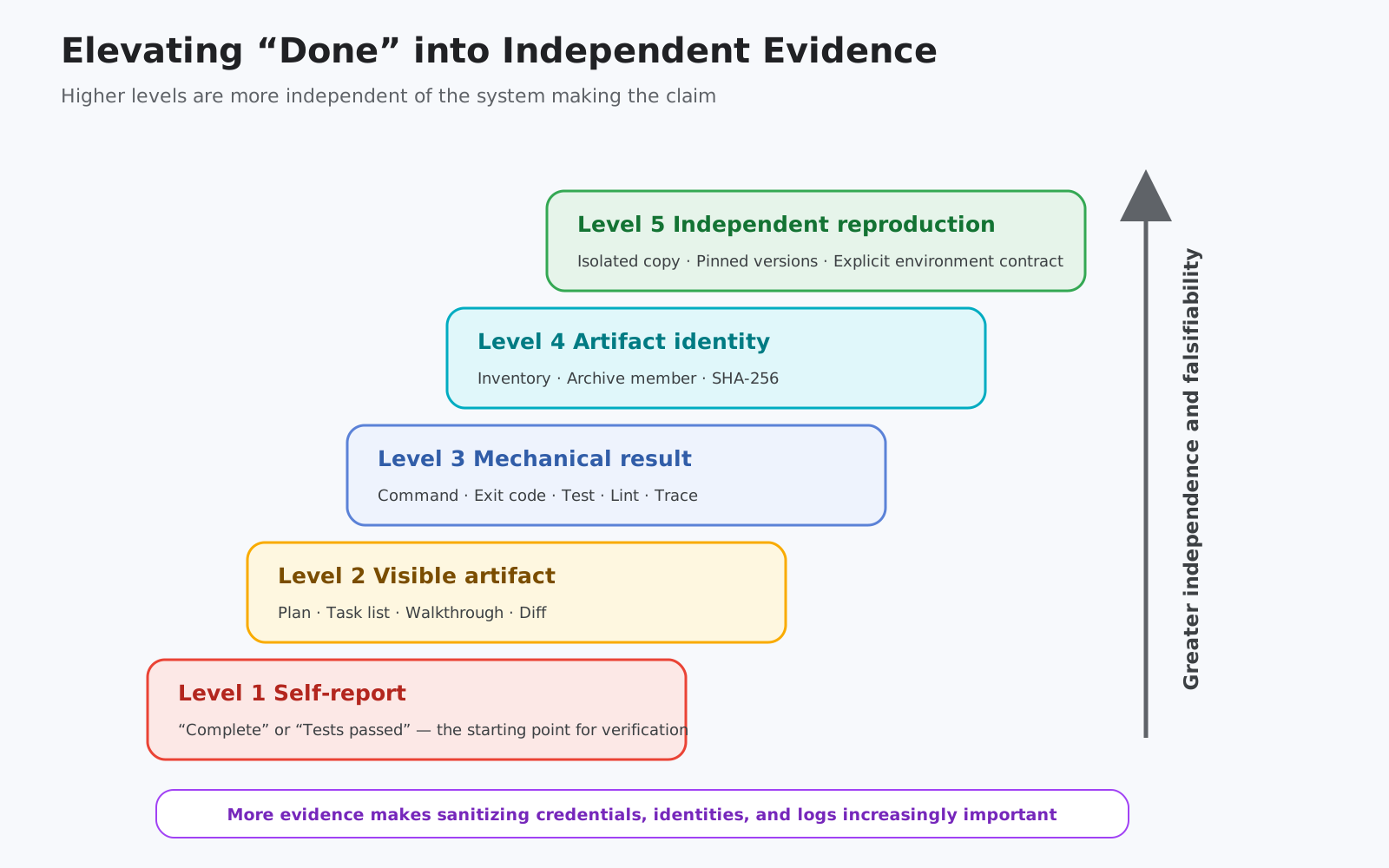
For example:
- The Agent’s self-report
- Visible Artifacts such as a Plan, Task List, or Walkthrough
- Command, Exit code, Test, Lint, and Trace data
- Inventory, Version, and Hash of the target Artifact
- Independent re-execution in an isolated environment
However, more evidence is not always better. If Logs and Traces duplicate Credentials, personal information, or customer data, they create a new surface for leakage. The evidence plane also requires Data minimization, Retention, and Access control.
10.5 Skill Routing Also Requires Regression Tests
As the number of Skills grows, similar description fields compete. Adding a new Skill can cause an existing request to be routed to a different Skill.
At minimum, three types of cases should be evaluated:
- Positive case: The correct Skill is selected for a target request
- Negative case: The Skill is not selected for an unrelated request
- Collision case: The correct Skill is chosen even when similar Skills exist
Execution after selection should also be evaluated separately.
- Was the correct Tool selected?
- Were the arguments correct?
- Were the Tools called in an allowed order?
- Were prohibited Tools avoided?
- Did execution stop safely when an intermediate step failed?
Skill quality should not be assessed only through text review. It must be converted into Regression Tests for Routing and Trajectory.
11. If You Introduce This Internally, Start by Creating a Skill Registry
When creating a Skill Catalog, listing only names and descriptions is insufficient. The following information should be linked.
| Field | Reason for management |
|---|---|
| Logical name / Directory name | Distinguishes Aliases and Renames |
| Scope | Distinguishes Global, Project, Plugin, and internal templates |
| Owner | Assigns responsibility for content, incidents, and deprecation decisions |
| Source / Commit | Tracks which version from which Repository is in use |
| SHA-256 | Detects different artifacts with the same name or Silent changes |
| Trigger description | Enables review of Routing collisions |
| Tool / MCP dependency | Detects states in which a Skill can be read but not executed |
| Required permission | Confirms File, Network, Terminal, and Cloud permissions |
| Side effect class | Distinguishes Read-only, Draft, Reversible, and Irreversible operations |
| Approval policy | Defines where human judgment is required |
| Validation contract | Defines what constitutes success |
| Rollback | Preserves a method for reversing changes |
| Last evaluated | Prevents outdated evaluation results from being carried forward |
| Consumers | Identifies which Projects, Agents, and Teams use the Skill |
Divide Adoption into Four Stages
Rather than immediately creating a company-wide Skill Catalog, the following sequence is more practical.
Stage 1: Low-Risk Project-Local Skills
Begin with work that has minimal side effects, such as code review, document formatting, and Read-only research. Create Positive and Negative cases and observe the conditions under which each Skill is selected.
Stage 2: Integrate Deterministic Validators
Do not rely on prose alone for judgment. Delegate decisions to Schemas, Tests, Lint, Policy engines, and fixed Scripts. The Agent handles explanations of results and corrections.
Stage 3: Separate Permissions from Side Effects
Create tiers such as Read-only, Draft-only, and Action-allowed, aligning a Skill’s role with its actual permissions. Require explicit Approval for external transmission and production changes.
Stage 4: Connect Lifecycle and Governance
Bring Skill Versioning, Evaluation, Observability, Incident handling, and deprecation into the same management processes used for conventional Software Delivery.
12. The Truly Advanced Lessons from This Event
The superficial lesson is that “asking Antigravity in natural language allows you to build Agents and applications.” From a designer’s perspective, however, there are more important lessons.
Lesson 1: Freedom Does Not Necessarily Come from Reducing Structure
Participants could experiment freely not because there was no underlying structure, but because the organizers assumed responsibility for environmental differences, authentication, dependencies, instructional materials, and recovery.
Lesson 2: Skills Distribute Not Only Expertise, but Also the Organization’s Way of Working
Procedures such as “observe first,” “change one thing at a time,” “measure again,” and “state when something is unverified” are not merely technical knowledge; they are Engineering Culture. Skills can deliver that culture into runtime Context.
Lesson 3: Automation Maturity Cannot Be Measured by How Many Clicks Were Eliminated
Mature automation does not mean never stopping. It means stopping at the correct boundaries, explaining why failures occurred, supporting re-execution, and enabling rollback when necessary.
Lesson 4: Changing the Model Does Not Remove the Harness’s Responsibilities
Even as models become more capable, Scope, Permissions, Tools, State, Evidence, and Recovery are not designed automatically. On the contrary, the more operations a model can perform autonomously, the more important the surrounding Harness becomes.
Lesson 5: Good Instructional Design Directly Translates into Good Agent Operations Design
Learning objectives, prerequisites, incremental challenges, expected results, failure hints, and final verification closely mirror the Specification, Tooling, Evaluation, Observability, and Recovery needed when delegating work to an Agent.
What makes the Platform Track’s instructional Skill particularly interesting is that the boundary between instructional materials and operational Runbooks has become thin. A structure created to teach people also becomes a structure for operating Agents safely.
Conclusion—Design Where the AI Works Before Deciding What to Ask It to Do
A high-level view of the Build With Google 2026 environment reveals a continuous progression from Day 1 through Day 2.
Participants first learn the fundamentals of Projects and Skills, then divide the Agent development Lifecycle into stages, combine functionality in the App Track, govern Identity, permissions, and evidence in the Platform Track, and connect Agents to business Workflows in the Business Track.
At the center is neither a single model nor a magical prompt.
- Separation of a common Baseline from Project-specific differences
- Progressive Disclosure that reads only the knowledge needed
- Separation of Skills and Permissions
- Dual evaluation of Output and Trajectory
- Limited impact through temporary environments and recovery paths
- Evidence design that does not conflate observed facts, expectations, and inference
By layering these elements, the system retains the flexibility of natural language while improving reproducibility as real work.
In the era of AI agents, the model is not the only important design target.
The more capable an Agent becomes, the more valuable it is to design what it knows, what it can do, the order in which it acts, and what it leaves behind as evidence.
I believe this is the most significant insight revealed by the event environment.
References
- Authoring Google Antigravity Skills — Google Codelabs
- Code with AI — Agent Development Kit
- Evaluation Guide — Agents CLI
- Google Agents CLI — GitHub
- Build with Gemini App Builders Starter Repository
- Build With Google Day 1 Lab 1 Guide
- Build With Google Day 1 Lab 2 Guide
- Build With Google Day 2 Platform Guide
- Build With Google Day 2 App Guide
- Build With Google Day 2 Business Guide
Research Limitations
- The settings reflect the state at the time of observation and may not all match the initial values immediately after distribution.
- Account Setup could not be completed in the currently reassigned App Track environment, so its current Global preset and Skill hash could not be confirmed. Therefore, earlier direct observations and definitions from the public Starter are treated separately.
- The existence of a File is distinguished from its being active in the current Project.
- No speculation is made about the private internal implementation of the Skill router or the authorship of individual instructional files.
- This research did not retrieve or transfer authentication information, log in or Push to GitHub, or transmit Artifacts to external services.